Inclusive Vibe Coding: Making AI-Generated Products Work for Everyone, by Design
Vibe coding is producing inaccessible software at scale. Here's the practice I use to direct it better, and a framework for building AI-generated products that work for everyone by design.

I vibe code. I'm also an inclusive designer with 25+ years of UX experience and a PhD in inclusive design. Those two things aren't in tension. They're the point.
Vibe coding is the practice, coined by Andrej Karpathy in early 2025, of describing what you want in natural language and letting an AI build it. You don't read the code. You don't own the implementation. You test the experience, and if something breaks, you paste the error back in. Karpathy's framing was that you "forget the code even exists."
It sounds reckless. It often is. Most vibe-coded output fails accessibility on day one. Not because the tools are hostile, but because the people prompting don't know to ask. The AI generates what is statistically common in its training data: div soup instead of semantic HTML, color-only status indicators, unlabeled form fields, focus traps, keyboard navigation that breaks the moment you unplug your mouse. "It works" in most vibe coding means it works for the prompter on their machine, on their network, with their body, with their senses.
That is not building for everyone. That is building for one specific person and shipping the exclusion.
The gap
Vibe coding is moving faster than the practice around it. Y Combinator reported in March 2025 that a quarter of its Winter 2025 startup batch had codebases that were 95% AI-generated. Professional engineers are adopting it for commercial work. Non-technical creators are launching products in days. The ceiling keeps rising. The floor for accessibility stays where it is.
This matters because the people being excluded by vibe-coded products are the same people who have been excluded from software for decades. Disabled users. Users navigating with assistive tech. Users on small screens, slow connections, older devices. Users whose native language is not English. Users whose cognitive patterns don't match the designer's.
If we let vibe coding scale without inclusive design baked in, we don't get a democratization of software. We get the same exclusion at ten times the volume.
The practice I'm calling Inclusive Vibe Coding
I'm calling this Inclusive Vibe Coding. Whether the term sticks or not, the practice matters.
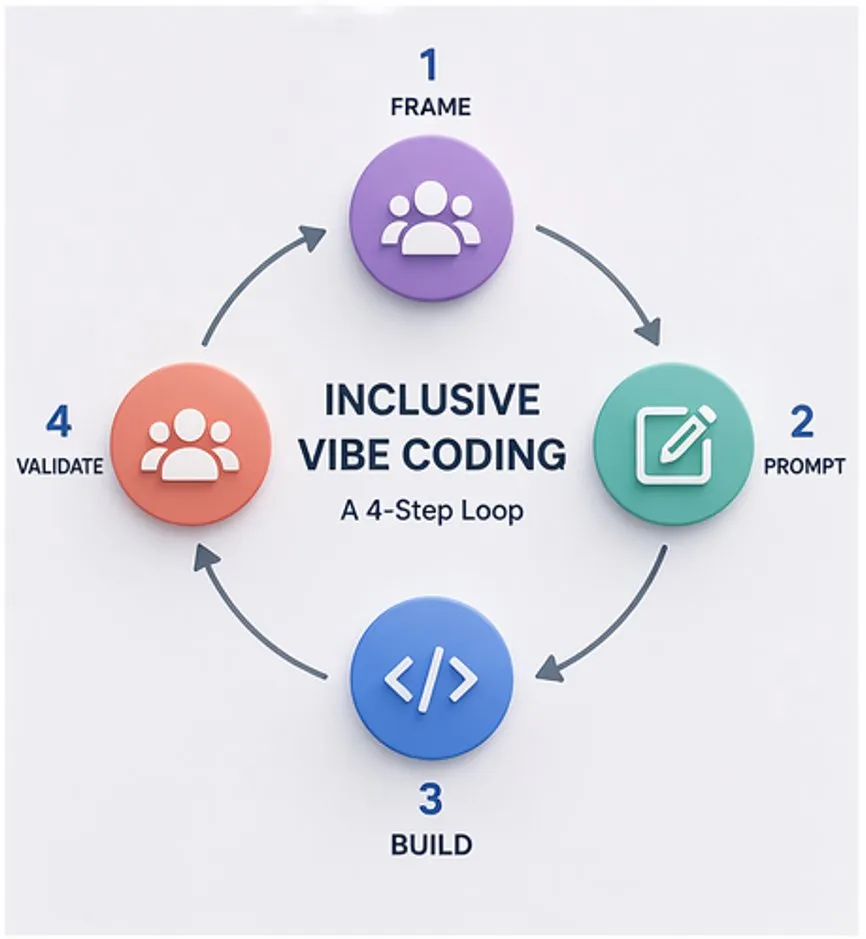
The core move is simple: you encode inclusive design requirements into the build loop itself, so the output is accessible by construction rather than retrofitted after the fact. You don't stop vibe coding. You direct it better.
Here is the framework I use. Four steps.
1. Frame
Before you prompt anything, define the experience, the user, and who is excluded by default.
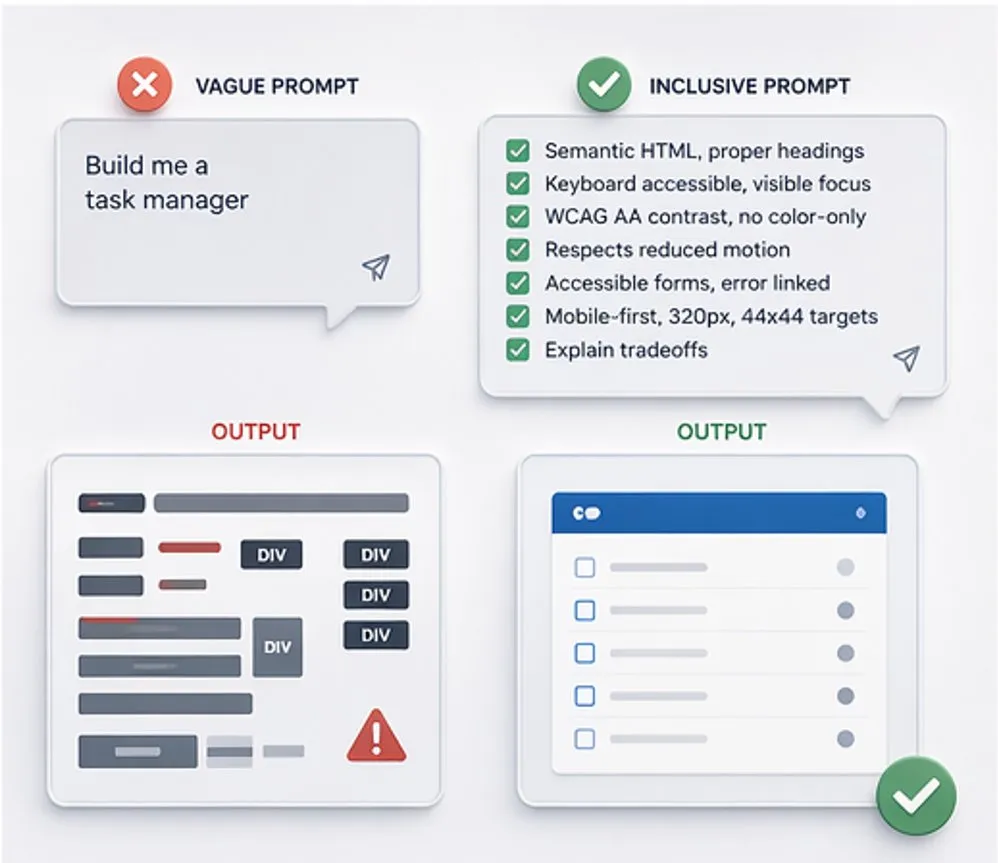
This is the part most vibe coders skip. They jump straight to "build me a task manager" without asking who the task manager is for, how they will interact with it, or who is already being designed out by the assumptions baked into the request.
Frame by asking: Who is the narrowest, most constrained user I can imagine for this? What does it need to do for them? What assumptions about sight, hearing, motor control, cognition, language, device, and context am I making by default?
This is "build for one, extend to many" applied to the prompt itself. Design for the narrowest case first. The broad case takes care of itself.
2. Prompt
Translate the frame into a structured prompt that embeds inclusive design requirements as non-negotiable build criteria.
Most vibe coders ask for features. Inclusive vibe coders ask for features with explicit accessibility and inclusion requirements attached. The AI will generate whatever you specify. If you don't specify, you inherit the defaults baked into the training data, and those defaults are exclusive.
A baseline prompt layer I use on every build:
Requirements:
- Semantic HTML with proper heading hierarchy, native elements over ARIA
- Full keyboard operability, visible focus indicators, logical tab order
- WCAG AA contrast minimum, no color-only communication
- Respects prefers-reduced-motion
- Form errors programmatically linked to inputs
- Mobile-first, works at 320px width
- Touch targets minimum 44x44px
- Start with the simplest working version
- Explain any accessibility tradeoffs in plain language
Paste it, customize the build ask above it, send. Removes the cognitive load of remembering every requirement every time. Makes accessibility the default, not the afterthought.
3. Build
Iterate with the AI, but test against real inclusive criteria as you go.
Unplug your mouse for five minutes. Can you use the thing? Shrink your browser to 320 pixels. Does it still work? Turn on the OS reduced motion setting. Does the animation respect it? Run a contrast checker on the output. Does it pass? Try a screen reader on the form. Is the error message announced?
These tests take minutes. They are non-negotiable. If the AI output fails any of them, you prompt for the fix and re-test. You are not checking the code. You are checking the experience, which is the job you are already qualified to do.
4. Validate
Test with actual users, especially users the prompt wasn't written for.
This is the step that separates inclusive vibe coding from a checklist exercise. Standards compliance is necessary and insufficient. WCAG AA is a floor, not a ceiling. The only way to know your product works for someone is to watch them use it.
Bring in co-design partners. Run sessions with disabled users, users on assistive tech, users in the contexts you haven't considered. Feed what you learn back into the frame and re-prompt. The loop closes here.
What this looks like in practice
I have built working prototypes, internal tools, and project management systems using this approach. The backend is not my concern. The experience is. Because I encode the inclusion requirements into the prompt, the output I get starts compliant. Because I test the experience, I catch what the AI gets wrong before it ships. Because I validate with real users, I improve the prompt for the next build.
This is not a theoretical framework. It is how I work.
Why this is a design discipline, not a trick
The question I kept coming back to as I developed this practice: is this the right interaction pattern for this task?
That question is at the heart of every design decision, and it is the one vibe coding cannot answer on its own. The AI can produce a drag-and-drop interaction, a modal, a form. It cannot tell you whether drag-and-drop excludes users who rely on keyboard or switch access. It cannot tell you whether the modal traps focus in a way that breaks screen reader flow. It cannot tell you whether the form's error pattern will confuse a user with cognitive load challenges.
A designer trained in inclusive practice can tell you all of that. Which is why inclusive vibe coding is not a technique available to anyone with a prompt box. It is a design discipline that uses vibe coding as one of its tools.
The bigger point
Accessibility and inclusion are not additive features. They are not the thing you layer on after the prototype works. They are the starting conditions, or they are absent.
Vibe coding as currently practiced is producing inaccessible software at scale. We have a choice about whether the next generation of AI-assisted products repeats the exclusions of the last generation or starts to correct them. The tools are ready. The practice has to catch up.
I work with teams on this through Cass Creative Studio. If your team is building with AI and you want what you ship to actually work for everyone, get in touch.